

The app shell: load the frame instantly, fill it after
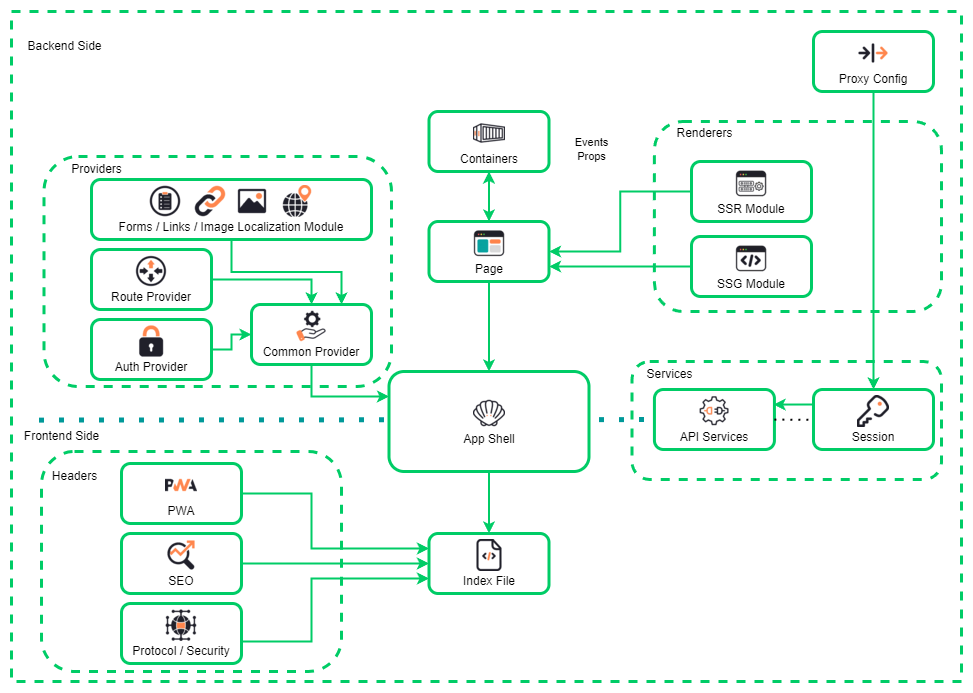
The app shell is the minimal HTML, CSS, and JavaScript needed to paint your app’s frame — the navigation, the layout, the header and chrome — without any of the content. The idea is to cache that shell aggressively so it renders instantly on every visit, giving the user visible structure in the first moment, while the actual content streams in afterward. It is the pattern behind apps that feel native and installable: open them and you immediately see the skeleton of the familiar interface, not a blank white page, because the frame came from cache and only the data had to travel.
Cache the shell with a service worker
The shell is static — it does not change per user or per request — so it is a perfect thing to cache in a service worker and serve without hitting the network. On install you precache the shell’s files; on fetch you serve them from cache first:
// service-worker.js — precache the shell, serve it instantly
const SHELL = ["/", "/shell.css", "/shell.js", "/nav.svg"];
self.addEventListener("install", (e) =>
  e.waitUntil(caches.open("shell-v1").then((c) => c.addAll(SHELL))));

self.addEventListener("fetch", (e) => {
  if (SHELL.includes(new URL(e.request.url).pathname)) {
    e.respondWith(caches.match(e.request));   // frame from cache, no network wait
  }
});
Now the second visit — and every offline visit — paints the frame with zero network latency.
Fill the content region separately
With the frame cached, the content becomes a separate, later concern. The shell renders immediately with a skeleton in the content area, then the data fetch resolves and replaces it:
// the shell is already on screen; fetch just the data for the main region
async function loadContent() {
  const main = document.querySelector("#content");
  main.innerHTML = renderSkeleton();                 // structure while we wait
  const data = await fetch("/api/feed").then((r) => r.json());
  main.innerHTML = renderFeed(data);                 // swap in real content
}
The user is looking at a real, familiar interface the entire time — the perceived performance is dominated by the instant shell, not the content fetch.
Where the shell pattern fits
The app shell is the natural architecture for a progressive web app: an installable, offline-capable app that should launch like a native one. It pairs with a cache strategy per resource type — shell precached, content network-first with a cache fallback, images cache-first — so the app degrades gracefully rather than showing a dinosaur when the connection drops. It is less relevant for a mostly-static content site (SSG already gives you a fast first paint) and most valuable for app-like experiences the user opens repeatedly. The trade to remember is versioning: because the shell is cached hard, you need a cache-busting strategy (a version in the cache name, as above) so a deploy actually reaches users instead of being masked by a stale shell. The offline-first-list and cache-headers exercises build the caching decisions the shell depends on, which is where the pattern stops being a diagram and becomes a working, offline-tolerant app.