

The Server Side
Server and Browser interaction
Learn the Basics



















Approach
This architecture provides the most elegant and advanced solution to achieve performance without braking the modularity of UI and The State. below are techniques to to do this on the server side of application
Folder Structure
.
├── ui
├── state
├── pages
│   ├── Home.js
│   ├── Services.js
│   ├── About.js
│   └── Contact.js
├── containers
│   ├── HeaderContainer.js
│   ├── FooterContainer.js
│   ├── CarouselContainer.js
│   └── TodoListContainer.js
├── constants
├── utils
│   ├── providers
│   └── services
│       └── api.js
├── App.js
├── sw.js
└── index.js
The image you provided represents a typical Frontend Server folder structure. It organizes the application into logical modules, making it easier to manage and scale. Below is an explanation of the structure and its components:
1. ui
- contains reusable UI components (e.g., buttons, modals, cards) that focus on presentation.
- These components are typically stateless and do not handle application logic.
2. state
- This folder manages global state for the application.
- It could include files related to Redux, Context API, or any other state management solution (e.g., reducers, actions, or context files).
3. pages
- Contains components for individual pages in the application.
- Examples:
Home.js: The homepage component.Services.js: A page displaying services offered.About.js: An “About Us” page.Contact.js: A contact form or contact details page.
- These components are typically connected to specific routes (e.g.,
/home,/about) and are rendered based on navigation.
4. containers
- Contains container components that manage logic and state for specific parts of the UI.
- Examples:
HeaderContainer.js: Handles logic related to the header (e.g., navigation links, user authentication status).FooterContainer.js: Manages footer-related data or events.CarouselContainer.js: Manages dynamic carousel data (e.g., fetching images from an API).TodoListContainer.js: Handles logic for a todo list (e.g., fetching tasks, managing task completion).
- These containers act as intermediaries between data sources (state or APIs) and presentational components.
5. constants
- stores constant values used across the application (e.g., API endpoints, configuration settings, or static strings).
6. utils
- Contains utility functions or helpers used throughout the app.
- Subfolders:
providers: Could include higher-order components (HOCs) or Context providers or injection for managing shared functionality like authentication, theme, or routing.services: contains files for interacting with external APIs. For example:api.js: Handles API calls (e.g., GET, POST requests) using libraries like Axios or Fetch.
7. Root Files
App.js: The main application component that serves as the entry point for rendering routes and initializing global providers.sw.js: Service worker file for enabling Progressive Web App (PWA) features like offline caching.index.js: The entry point of the Frontend application where the app is rendered into the DOM using the rendering engine of the framework.
Architecture
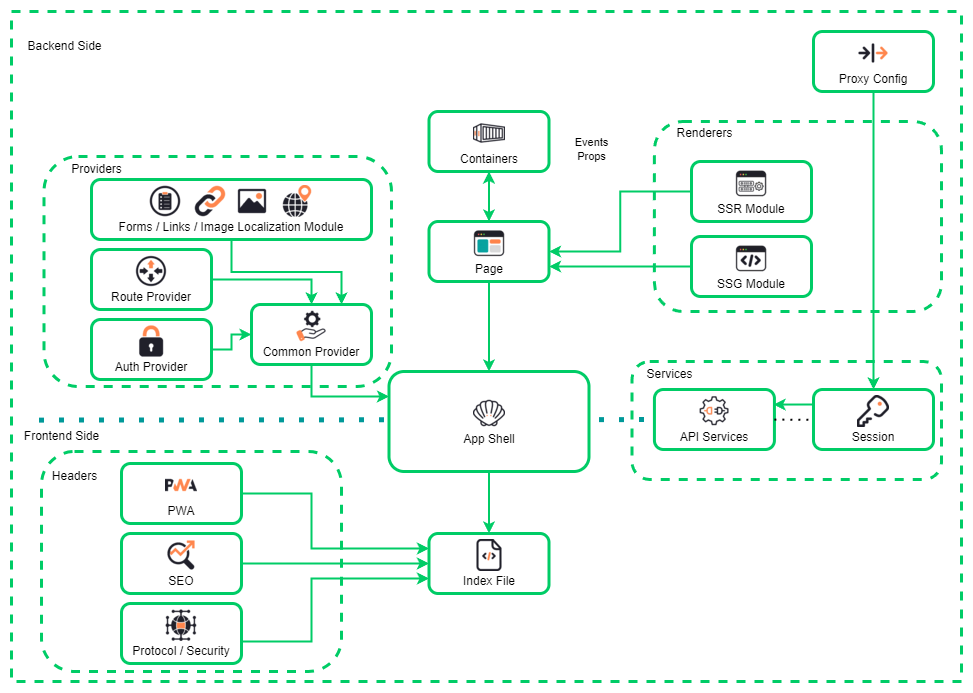
The diagram represents the architecture of a web application, with a focus on modular design and the separation of backend and frontend components.
Backend Side
- Providers:
- Forms / Links / Image Localization Module: Handles content-related functionalities like forms, links, and localized images.
- Route Provider: Manages routing within the application.
- Auth Provider: Responsible for authentication and security mechanisms.
- Common Provider: Acts as a shared utility or service layer connecting other providers.
- Renderers:
- SSR Module (Server-Side Rendering): Generates pages dynamically on the server for improved performance and SEO.
- SSG Module (Static Site Generation): Pre-generates static pages for faster delivery.
- Services:
- API Services: Facilitates communication between the frontend and backend via APIs.
- Session Management: Handles user sessions and authentication states.
- Proxy Config:
- for routing requests, load balancing, or API gateway functionality.
- Container: It acts as a bridge between the data layer (e.g., backend services, APIs) and the presentation layer (React components that render UI). Containers typically do not include presentational markup themselves but instead pass data and event handlers (via props) to child components.
Frontend Side
- Headers:
- PWA (Progressive Web App): Ensures offline capabilities, responsiveness, and app-like features.
- SEO (Search Engine Optimization): Optimizes content for search engines.
- Protocol / Security: Implements security measures like HTTPS protocols.
- App Shell:
- A lightweight framework responsible for rendering the core structure of the application and managing dynamic updates.
- Index File:
- Serves as the entry point for the frontend application, loading the app shell and initializing components.
Containers & Pages
- Containers encapsulate individual components or modules that render specific parts of a page.
- Pages receive events and props from containers to dynamically display content.
Key Concept 1:
Containers
- Container components (
HeaderContainer,FooterContainer, etc.) fetch data from APIs or global state and pass it down to presentational components in theuifolder or directly to pages in thepagesfolder. - For example:
- The
TodoListContainer.jsfetch a list of tasks from an API (services/api.js) and pass this data as props to a presentational component in theuifolder that renders the tasks visually.
- The
- REST Example
- GraphQL Example
- SWR
Key Concept 2:
App Shell
Key Concept 3:
Rendering and Services
Key Concept 4:
Optimization
Switch between skeletons from pre defined organism to container lazy imports Module federation for MFE PWA Strategies Preload SSR with State management