
Props
- Props are arguments passed into JS components
- Deliver structural information that unlike attributes, can be used by JS within components
- We can also define our custom properties, to define the custom behaviours of our custom elements.
- Properties can have any value and they are case sensitive.
Key Insight
Props are the contract between a component and its users—they define what data a component accepts, how it behaves, and how it communicates back to parent components. By treating props as an immutable, read-only interface, you create predictable, reusable components that work reliably across your entire application, making component APIs as clear and dependable as function signatures.
Detailed Description
In component-based architecture, props (short for “properties”) serve as the primary mechanism for passing data from parent components to children. They function similarly to function parameters in traditional programming: a parent component provides values through props, and the child component uses those values to render its output. This unidirectional data flow—from parent to child—is fundamental to the Universal Frontend Architecture and creates predictable, debuggable applications.
Props are intentionally immutable within the receiving component. When a component receives props, it cannot modify them directly—this constraint enforces the principle that data flows down the component tree while events flow up. If a child component needs to “change” a prop value, it calls a callback function passed as a prop, which allows the parent to update its state, triggering a re-render with new props. This pattern prevents the chaotic bidirectional data flow that plagues many UI frameworks.
The distinction between props and state is crucial: props are external inputs controlled by parent components, while state is internal data managed by the component itself. A component’s props might include a username from a parent, while its state might track whether a dropdown is open. Props flow down from ancestors, state lives within the component, and together they determine what the component renders.
In the context of Web Components and custom elements, props vs attributes becomes important. HTML attributes (strings in markup) get converted to JavaScript properties (any type) on element instances. Modern frameworks abstract this complexity, but understanding the distinction helps when working with native Web Components or debugging framework behavior. Attributes are limited to strings in HTML, while props can be any JavaScript value—objects, arrays, functions.
Props serve as the component’s API, and like any API, should be designed with care. Well-designed props make components flexible without being overwhelming. Too few props make components inflexible and lead to duplication. Too many props create cognitive overload and make components difficult to use. The art lies in finding the right abstractions: provide props for things that vary, use sensible defaults for things that rarely change, and leverage composition (children prop) for flexible content.
Code Examples
Basic Example: Simple Props Usage
Fundamental props demonstration showing data flow:
// Button.js - Component receiving props

import React from 'react';

const Button = ({ label, onClick, variant = 'primary', disabled = false }) => {
  // Props are read-only - cannot modify them
  // variant and disabled have default values

  return (
    <button
      onClick={onClick}
      disabled={disabled}
      className={`btn btn--${variant}`}
    >
      {label}
    </button>
  );
};

export default Button;
Usage showing prop passing:
// App.js - Parent component passing props

import React from 'react';
import Button from './Button';

const App = () => {
  const handleClick = () => {
    console.log('Button clicked!');
  };

  return (
    <div>
      {/* Passing different props to same component */}
      <Button
        label="Save"
        onClick={handleClick}
        variant="primary"
      />

      <Button
        label="Cancel"
        onClick={() => console.log('Cancelled')}
        variant="secondary"
      />

      <Button
        label="Delete"
        onClick={() => console.log('Deleted')}
        variant="danger"
        disabled={true}
      />
    </div>
  );
};
Practical Example: Props with TypeScript and Validation
Real-world props with type safety and documentation:
// UserCard.tsx - Component with TypeScript props

import React from 'react';
import './UserCard.css';

// Define prop types interface
interface UserCardProps {
  // Required props (no ? mark)
  user: {
    id: string;
    name: string;
    email: string;
    avatar?: string;
  };

  // Optional props (with ? mark)
  showEmail?: boolean;

  // Callback props
  onEdit?: (userId: string) => void;
  onDelete?: (userId: string) => void;

  // Props with default values
  variant?: 'compact' | 'detailed';
  elevated?: boolean;
}

// Component with destructured props and defaults
const UserCard: React.FC<UserCardProps> = ({
  user,
  showEmail = true,
  onEdit,
  onDelete,
  variant = 'compact',
  elevated = false
}) => {
  return (
    <div className={`user-card user-card--${variant} ${elevated ? 'user-card--elevated' : ''}`}>
      <div className="user-card__avatar">
        {user.avatar ? (
          <img src={user.avatar} alt={user.name} />
        ) : (
          <div className="user-card__avatar-placeholder">
            {user.name.charAt(0)}
          </div>
        )}
      </div>

      <div className="user-card__info">
        <h3 className="user-card__name">{user.name}</h3>
        {showEmail && (
          <p className="user-card__email">{user.email}</p>
        )}
      </div>

      {(onEdit || onDelete) && (
        <div className="user-card__actions">
          {onEdit && (
            <button onClick={() => onEdit(user.id)}>
              Edit
            </button>
          )}
          {onDelete && (
            <button onClick={() => onDelete(user.id)}>
              Delete
            </button>
          )}
        </div>
      )}
    </div>
  );
};

export default UserCard;
Usage with type checking:
import React from 'react';
import UserCard from './UserCard';

const UserList = () => {
  const users = [
    { id: '1', name: 'Alice Johnson', email: 'alice@example.com', avatar: '/alice.jpg' },
    { id: '2', name: 'Bob Smith', email: 'bob@example.com' }
  ];

  const handleEdit = (userId: string) => {
    console.log('Editing user:', userId);
  };

  const handleDelete = (userId: string) => {
    if (confirm('Are you sure?')) {
      console.log('Deleting user:', userId);
    }
  };

  return (
    <div className="user-list">
      {users.map(user => (
        <UserCard
          key={user.id}
          user={user}
          showEmail={true}
          onEdit={handleEdit}
          onDelete={handleDelete}
          variant="detailed"
          elevated
        />
      ))}
    </div>
  );
};
Advanced Example: Props Spreading, Children, and Composition
Sophisticated props patterns for flexible components:
// Card.js - Flexible component with composition

import React from 'react';
import './Card.css';

const Card = ({
  children,           // Special prop for nested content
  header,             // Named slot
  footer,             // Named slot
  className = '',     // Additional CSS classes
  ...restProps        // Spread remaining props to root element
}) => {
  return (
    <article
      className={`card ${className}`}
      {...restProps}    // Passes onClick, data-*, aria-*, etc.
    >
      {header && (
        <header className="card__header">
          {header}
        </header>
      )}

      <div className="card__body">
        {children}      {/* Flexible content slot */}
      </div>

      {footer && (
        <footer className="card__footer">
          {footer}
        </footer>
      )}
    </article>
  );
};

export default Card;
Advanced usage patterns:
import React from 'react';
import Card from './Card';
import Button from './Button';

const ProductPage = () => {
  return (
    <div>
      {/* Pattern 1: Using children prop */}
      <Card>
        <h2>Simple Content</h2>
        <p>This goes in the children slot.</p>
      </Card>

      {/* Pattern 2: Using named slots (header, footer) */}
      <Card
        header={<h2>Product Details</h2>}
        footer={
          <div>
            <Button label="Add to Cart" variant="primary" />
            <Button label="Save for Later" variant="secondary" />
          </div>
        }
      >
        <p>Product description goes here.</p>
        <span>$99.99</span>
      </Card>

      {/* Pattern 3: Props spreading for accessibility */}
      <Card
        onClick={() => console.log('Card clicked')}
        role="button"
        tabIndex={0}
        aria-label="Product card"
        data-product-id="123"
        className="product-card"
      >
        <h3>Clickable Card</h3>
      </Card>

      {/* Pattern 4: Render props pattern */}
      <DataProvider
        render={(data) => (
          <Card>
            <h3>{data.title}</h3>
            <p>{data.description}</p>
          </Card>
        )}
      />
    </div>
  );
};
All attributes and properties are a bit hard to understand by just looking into the code, it will get easier once you’ll see it working in a real custom element. Meanwhile, remember the trick to achieve reflection: linking get/set property methods to get/set attribute methods
Maybe this schema will help clarify how attributes and properties reflection works:
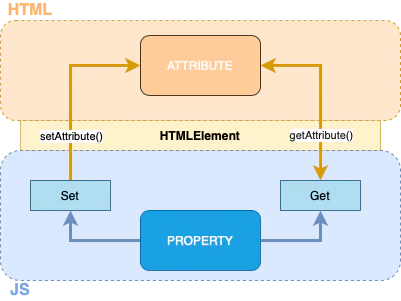
Click here to learn more about the difference between props and attributes.
Common Mistakes
1. Mutating Props Directly
Mistake: Attempting to modify props within the component.
// ❌ BAD: Mutating props
const UserProfile = ({ user }) => {
  // Trying to modify props directly
  user.name = user.name.toUpperCase();  // ERROR! Props are read-only

  return <h1>{user.name}</h1>;
};
// ✅ GOOD: Compute derived values without mutation
const UserProfile = ({ user }) => {
  // Create new value without mutating props
  const displayName = user.name.toUpperCase();

  return <h1>{displayName}</h1>;
};

// ✅ GOOD: Use state if you need to modify
const UserProfile = ({ user: initialUser }) => {
  const [user, setUser] = useState(initialUser);

  const handleNameChange = (newName) => {
    setUser({ ...user, name: newName });  // Update state, not props
  };

  return (
    <div>
      <h1>{user.name}</h1>
      <input value={user.name} onChange={(e) => handleNameChange(e.target.value)} />
    </div>
  );
};
Why it matters: Props are immutable by design. Mutating them breaks React’s reconciliation, causes unpredictable renders, and violates the unidirectional data flow principle. See State for managing changeable data.
2. Prop Drilling Through Multiple Levels
Mistake: Passing props through many intermediate components that don’t use them.
// ❌ BAD: Prop drilling through unnecessary levels
const App = () => {
  const user = { name: 'Alice', role: 'admin' };
  return <Dashboard user={user} />;
};

const Dashboard = ({ user }) => {
  return <Layout user={user} />;  // Just passing through
};

const Layout = ({ user }) => {
  return <Sidebar user={user} />;  // Just passing through
};

const Sidebar = ({ user }) => {
  return <UserMenu user={user} />;  // Just passing through
};

const UserMenu = ({ user }) => {
  return <div>{user.name}</div>;  // Finally using it!
};
// ✅ GOOD: Use Context API for deeply nested data
import React, { createContext, useContext } from 'react';

// Create context
const UserContext = createContext(null);

const App = () => {
  const user = { name: 'Alice', role: 'admin' };

  return (
    <UserContext.Provider value={user}>
      <Dashboard />
    </UserContext.Provider>
  );
};

const Dashboard = () => <Layout />;  // No props needed
const Layout = () => <Sidebar />;    // No props needed
const Sidebar = () => <UserMenu />;  // No props needed

const UserMenu = () => {
  const user = useContext(UserContext);  // Access directly
  return <div>{user.name}</div>;
};
Why it matters: Prop drilling creates fragile code where intermediate components become coupled to data they don’t use. Context, composition, or state management libraries (Redux, Zustand) solve this more elegantly.
3. Not Using Default Props
Mistake: Handling undefined props with verbose conditional logic.
// ❌ BAD: Defensive checks everywhere
const Button = (props) => {
  const label = props.label ? props.label : 'Click Me';
  const variant = props.variant ? props.variant : 'primary';
  const disabled = props.disabled !== undefined ? props.disabled : false;

  return (
    <button
      className={`btn btn--${variant}`}
      disabled={disabled}
    >
      {label}
    </button>
  );
};
// ✅ GOOD: Default parameter values (modern JavaScript)
const Button = ({
  label = 'Click Me',
  variant = 'primary',
  disabled = false,
  onClick
}) => {
  return (
    <button
      className={`btn btn--${variant}`}
      disabled={disabled}
      onClick={onClick}
    >
      {label}
    </button>
  );
};

// ✅ GOOD: TypeScript with default props
interface ButtonProps {
  label?: string;
  variant?: 'primary' | 'secondary' | 'danger';
  disabled?: boolean;
  onClick?: () => void;
}

const Button: React.FC<ButtonProps> = ({
  label = 'Click Me',
  variant = 'primary',
  disabled = false,
  onClick
}) => {
  // Component implementation
};
Why it matters: Default props make components easier to use, reduce boilerplate, and make the API more discoverable. Users can see default behavior without reading documentation.
Quick Quiz
Question 1: What happens if you try to modify a prop inside a component?
**Answer:** In **React**, props are **read-only** and attempting to modify them will: 1. In development mode: Trigger a warning or error 2. In production: May appear to work but breaks React's reconciliation and causes bugs 3. Violates the principle of unidirectional data flow **Example of the problem:** ```jsx const MyComponent = ({ count }) => { count = count + 1; // ❌ TypeError in strict mode or silent bug returnQuestion 2: What's the difference between props and attributes in Web Components?
**Answer:** **Attributes** (HTML/DOM): - **Format:** Always strings in HTML markup - **Syntax:** `Question 3: Should you pass individual values or entire objects as props?
**Answer:** **It depends on the use case.** Both patterns have trade-offs: **Pass individual values when:** - Component only needs a few specific values - You want explicit, clear interfaces - You want to minimize re-renders (React only re-renders when specific values change) ```jsx // ✅ GOOD: Explicit, minimal props const UserGreeting = ({ firstName, lastName }) => (Hello, {firstName} {lastName}!
); <UserGreeting firstName={user.firstName} lastName={user.lastName} /> ``` **Pass objects when:** - Many related values need to be passed together - Object represents a cohesive entity - You want to reduce prop drilling - Component truly uses most/all object properties ```jsx // ✅ GOOD: Cohesive object const UserProfile = ({ user }) => ({user.name}
{user.email}
{user.bio}
<img src={user.avatar} alt={user.name} />Question 4: How do you type-check props effectively?
**Answer:** Several approaches depending on your stack: **1. TypeScript (recommended for large projects):** ```typescript interface ButtonProps { label: string; // Required onClick: () => void; // Required callback variant?: 'primary' | 'secondary'; // Optional with literal types disabled?: boolean; icon?: React.ReactNode; } const Button: React.FCQuestion 5: What is the `children` prop and when should you use it?
**Answer:** `children` is a **special prop** that contains whatever is placed between a component's opening and closing tags. It enables **composition** - building complex UIs by nesting components. **Basic usage:** ```jsx const Card = ({ children }) => (Title
Content goes here
Title
,Content goes here
] ``` **Use `children` when:** **1. Building layout components:** ```jsx const Container = ({ children }) => ({title}
{children}About content...
Are you sure you want to proceed?
- Item 1
- Item 2
- {items}